Spring Bootの相関チェックをform内で実行してみた
Spring BootのWEB画面上での相関チェックは、form内で@AssertTrueアノテーションでも実行できることがわかったので、そのサンプルプログラムを共有する。
前提条件
下記記事の実装が完了していること。

サンプルプログラムの作成
作成したサンプルプログラムの構成は以下の通り。
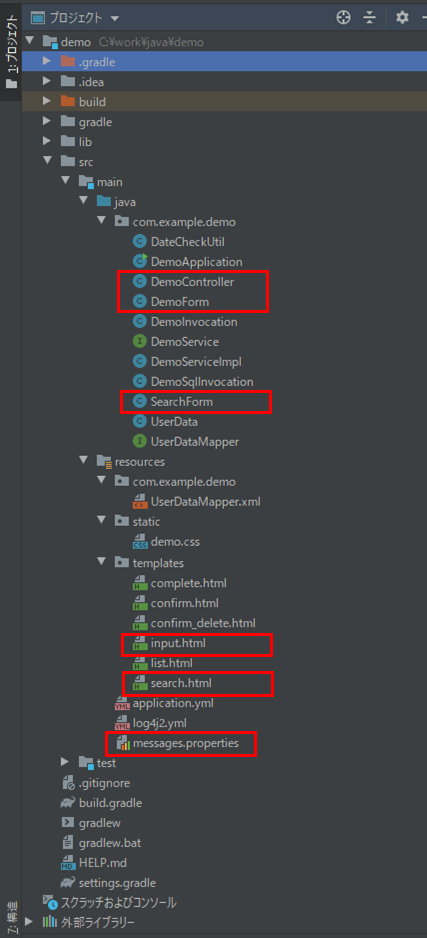
なお、上図の赤枠が、前提条件のプログラムから変更したプログラムとなる。また、「DemoFormCheckValidator.java」「SearchFormCheckValidator.java」は不要なので削除している。
フォームクラスの内容はそれぞれ以下の通りで、@AssertTrueアノテーションを付与した、DateCheckUtilクラスを利用した生年月日のチェック処理や、性別のチェック処理を追加している。
package com.example.demo;

import lombok.Data;
import org.springframework.util.StringUtils;
import javax.validation.constraints.AssertTrue;
import javax.validation.constraints.NotEmpty;
import java.io.Serializable;
import java.util.LinkedHashMap;
import java.util.Map;

/**
 * Formオブジェクトのクラス
 */
@Data
public class DemoForm implements Serializable {

    /** ID */
    private String id;

    /** 名前 */
    @NotEmpty
    private String name;

    /** 生年月日_年 */
    private String birthYear;

    /** 生年月日_月 */
    private String birthMonth;

    /** 生年月日_日 */
    private String birthDay;

    /** 性別 */
    @NotEmpty
    private String sex;

    /** メモ */
    private String memo;

    /** 確認チェック */
    @NotEmpty
    private String checked;

    /** 性別(文字列) */
    private String sex_value;

    /** 生年月日_月のMapオブジェクト */
    public Map<String,String> getMonthItems(){
        Map<String, String> monthMap = new LinkedHashMap<String, String>();
        for(int i = 1; i <= 12; i++){
            monthMap.put(String.valueOf(i), String.valueOf(i));
        }
        return monthMap;
    }

    /** 生年月日_日のMapオブジェクト */
    public Map<String,String> getDayItems(){
        Map<String, String> dayMap = new LinkedHashMap<String, String>();
        for(int i = 1; i <= 31; i++){
            dayMap.put(String.valueOf(i), String.valueOf(i));
        }
        return dayMap;
    }

    /** 性別のMapオブジェクト */
    public Map<String,String> getSexItems(){
        Map<String, String> sexMap = new LinkedHashMap<String, String>();
        sexMap.put("1", "男");
        sexMap.put("2", "女");
        return sexMap;
    }

    /**
     * 生年月日_年が空文字でないかをチェックする
     * @return チェック結果
     */
    @AssertTrue(message = "{validation.date-empty}")
    public boolean isBirthYearEmpty(){
        return DateCheckUtil.checkDate(birthYear, birthMonth, birthDay) != 1;
    }

    /**
     * 生年月日_月が空文字でないかをチェックする
     * @return チェック結果
     */
    @AssertTrue(message = "{validation.date-empty}")
    public boolean isBirthMonthEmpty(){
        return DateCheckUtil.checkDate(birthYear, birthMonth, birthDay) != 2;
    }

    /**
     * 生年月日_日が空文字でないかをチェックする
     * @return チェック結果
     */
    @AssertTrue(message = "{validation.date-empty}")
    public boolean isBirthDayEmpty(){
        return DateCheckUtil.checkDate(birthYear, birthMonth, birthDay) != 3;
    }

    /**
     * 生年月日の日付が不正でないかをチェックする
     * @return チェック結果
     */
    @AssertTrue(message = "{validation.date-invalidate}")
    public boolean isBirthDayInvalid(){
        return DateCheckUtil.checkDate(birthYear, birthMonth, birthDay) != 4;
    }

    /**
     * 生年月日の日付が未来日でないかをチェックする
     * @return チェック結果
     */
    @AssertTrue(message = "{validation.date-future}")
    public boolean isBirthDayFuture(){
        return DateCheckUtil.checkDate(birthYear, birthMonth, birthDay) != 5;
    }

    /**
     * 性別が不正な値でないかチェックする
     * @return チェック結果
     */
    @AssertTrue(message = "{validation.sex-invalidate}")
    public boolean isSexInvalid(){
        return StringUtils.isEmpty(sex) || getSexItems().keySet().contains(sex);
    }

}
package com.example.demo;

import lombok.Data;
import javax.validation.constraints.AssertTrue;
import java.util.LinkedHashMap;
import java.util.Map;

@Data
public class SearchForm {

    /** 検索用名前 */
    private String searchName;

    /** 生年月日_年_from */
    private String fromBirthYear;

    /** 生年月日_月_from */
    private String fromBirthMonth;

    /** 生年月日_日_from */
    private String fromBirthDay;

    /** 生年月日_年_to */
    private String toBirthYear;

    /** 生年月日_月_to */
    private String toBirthMonth;

    /** 生年月日_日_to */
    private String toBirthDay;

    /** 検索用性別 */
    private String searchSex;

    /** 一覧画面の現在ページ数 */
    private int currentPageNum;

    /** 生年月日_月のMapオブジェクト */
    public Map<String,String> getMonthItems(){
        Map<String, String> monthMap = new LinkedHashMap<String, String>();
        for(int i = 1; i <= 12; i++){
            monthMap.put(String.valueOf(i), String.valueOf(i));
        }
        return monthMap;
    }

    /** 生年月日_日のMapオブジェクト */
    public Map<String,String> getDayItems(){
        Map<String, String> dayMap = new LinkedHashMap<String, String>();
        for(int i = 1; i <= 31; i++){
            dayMap.put(String.valueOf(i), String.valueOf(i));
        }
        return dayMap;
    }

    /** 性別のMapオブジェクト */
    public Map<String,String> getSexItems(){
        Map<String, String> sexMap = new LinkedHashMap<String, String>();
        sexMap.put("1", "男");
        sexMap.put("2", "女");
        return sexMap;
    }

    /**
     * 生年月日_fromが不正でないかをチェックする
     * @return チェック結果
     */
    @AssertTrue(message = "{validation.date-invalidate-from}")
    public boolean isFromBirthDayInvalid(){
        return DateCheckUtil.checkSearchForm(this) != 1;
    }

    /**
     * 生年月日_toが不正でないかをチェックする
     * @return チェック結果
     */
    @AssertTrue(message = "{validation.date-invalidate-to}")
    public boolean isToBirthDayInvalid(){
        return DateCheckUtil.checkSearchForm(this) != 2;
    }

    /**
     * 生年月日_from>生年月日_toでないかをチェックする
     * @return チェック結果
     */
    @AssertTrue(message = "{validation.date-invalidate-from-to}")
    public boolean isInvalidBirthDayFromTo(){
        return DateCheckUtil.checkSearchForm(this) != 3;
    }
}
また、messages.propertiesの内容は以下の通りで、birthYearEmpty・birthMonthEmpty・birthDayEmptyのラベルを追加している。
#メッセージ
validation.date-empty={0}を入力してください。
validation.date-invalidate=生年月日が存在しない日付になっています。
validation.date-future=生年月日が未来の日付になっています。
validation.empty-msg=
javax.validation.constraints.NotEmpty.message={0}を入力してください。
validation.sex-invalidate=性別に不正な値が入っています。
validation.date-invalidate-from=生年月日(From)の日付が不正です。
validation.date-invalidate-to=生年月日(To)の日付が不正です。
validation.date-invalidate-from-to=生年月日(From)が生年月日(To)より大きくなっています。

#フィールド名
name=名前
sex=性別
checked=確認チェック
birthYearEmpty=生年月日_年
birthMonthEmpty=生年月日_月
birthDayEmpty=生年月日_日
さらに、入力画面の内容は以下の通り。
<!DOCTYPE html>
<html lang="ja" xmlns:th="http://www.thymeleaf.org">
<head>
    <meta charset="UTF-8">
    <link th:href="@{/demo.css}" rel="stylesheet" type="text/css" />
    <title>入力画面</title>
</head>
<body>
  <p>下記必要事項を記載の上、「確認」ボタンを押下してください。</p><br/>
   <form method="post" th:action="@{/confirm}" th:object="${demoForm}">
       <table border="0">
           <tr>
               <td align="left" valign="top">名前:</td>
               <td>
                   <input type="text" th:value="*{name}"
                          th:field="*{name}" th:errorclass="fieldError" />
                   <span th:if="*{#fields.hasErrors('name')}"
                         th:errors="*{name}" class="errorMessage"></span>
               </td>
           </tr>
           <tr>
               <td align="left" valign="top">生年月日:</td>
               <td>
                   <input type="text" th:value="*{birthYear}" size="4"
                          maxlength="4" th:field="*{birthYear}" th:errorclass="fieldError"
                          th:classappend="${#fields.hasErrors('birthYearEmpty')
                                || #fields.hasErrors('birthDayInvalid')
                                || #fields.hasErrors('birthDayFuture')} ? 'fieldError'" />年
                   <select th:field="*{birthMonth}" th:errorclass="fieldError"
                           th:classappend="${#fields.hasErrors('birthMonthEmpty')
                                || #fields.hasErrors('birthDayInvalid')
                                || #fields.hasErrors('birthDayFuture')} ? 'fieldError'">
                       <option value="">---</option>
                       <option th:each="item : *{getMonthItems()}"
                               th:value="${item.key}" th:text="${item.value}"/>
                   </select>月
                   <select th:field="*{birthDay}" th:errorclass="fieldError"
                           th:classappend="${#fields.hasErrors('birthDayEmpty')
                                || #fields.hasErrors('birthDayInvalid')
                                || #fields.hasErrors('birthDayFuture')} ? 'fieldError'">
                       <option value="">---</option>
                       <option th:each="item : *{getDayItems()}"
                               th:value="${item.key}" th:text="${item.value}"/>
                   </select>日
                   <span th:if="*{#fields.hasErrors('birthYearEmpty')}"
                         th:errors="*{birthYearEmpty}" class="errorMessage"></span>
                   <span th:if="*{#fields.hasErrors('birthMonthEmpty')}"
                         th:errors="*{birthMonthEmpty}" class="errorMessage"></span>
                   <span th:if="*{#fields.hasErrors('birthDayEmpty')}"
                         th:errors="*{birthDayEmpty}" class="errorMessage"></span>
                   <span th:if="*{#fields.hasErrors('birthDayInvalid')}"
                         th:errors="*{birthDayInvalid}" class="errorMessage"></span>
                   <span th:if="*{#fields.hasErrors('birthDayFuture')}"
                         th:errors="*{birthDayFuture}" class="errorMessage"></span>
               </td>
           </tr>
           <tr>
               <td align="left" valign="top">性別:</td>
               <td>
                   <for th:each="item : *{getSexItems()}">
                       <input type="radio" name="sex" th:value="${item.key}" th:text="${item.value}"
                              th:field="*{sex}" th:errorclass="fieldError" />
                   </for>
                   <span th:if="*{#fields.hasErrors('sex')}"
                         th:errors="*{sex}" class="errorMessage"></span>
                   <span th:if="*{#fields.hasErrors('sexInvalid')}"
                         th:errors="*{sexInvalid}" class="errorMessage"></span>
               </td>
           </tr>
           <tr>
               <td align="left" valign="top">メモ:</td>
               <td>
                   <textarea rows="6" cols="40" th:value="*{memo}" th:field="*{memo}"></textarea>
               </td>
           </tr>
           <tr>
               <td align="left" valign="top">入力確認:</td>
               <td>
                   <input type="checkbox" name="checked" th:value="確認済"
                          th:field="*{checked}" th:errorclass="fieldError" />
                   <span th:if="*{#fields.hasErrors('checked')}"
                         th:errors="*{checked}" class="errorMessage"></span>
               </td>
           </tr>
       </table>
       <br/><br/>
       <input type="submit" name="next" value="確認" />
       <input type="submit" name="back" value="戻る" />
   </form>
</body>
</html>
「DemoForm.java」で追加した、@AssertTrueアノテーションを付与したチェック処理のエラーメッセージを、生年月日と性別のspanタグに追加し、th:classappendタグにてエラー項目の赤反転処理を追加している。
また、検索画面の内容は以下の通りで、「SearchForm.java」のエラーメッセージ表示・エラー項目赤反転の処理を追加している。
<!DOCTYPE html>
<html lang="ja" xmlns:th="http://www.thymeleaf.org">
<head>
    <meta charset="UTF-8">
    <link th:href="@{/demo.css}" rel="stylesheet" type="text/css" />
    <title>index page</title>
</head>
<body>
    <p>検索条件を指定し、「検索」ボタンを押下してください。</p><br/>
    <form method="post" th:action="@{/search}" th:object="${searchForm}">
        <span th:if="*{#fields.hasErrors('fromBirthDayInvalid')}"
              th:errors="*{fromBirthDayInvalid}" class="errorMessage"></span>
        <span th:if="*{#fields.hasErrors('toBirthDayInvalid')}"
              th:errors="*{toBirthDayInvalid}" class="errorMessage"></span>
        <span th:if="*{#fields.hasErrors('invalidBirthDayFromTo')}"
              th:errors="*{invalidBirthDayFromTo}" class="errorMessage"></span>
        <table border="1" cellpadding="5">
            <tr>
                <th>名前</th>
                <td><input type="text" th:value="*{searchName}" th:field="*{searchName}" /></td>
            </tr>
            <tr>
                <th>生年月日</th>
                <td><input type="text" th:value="*{fromBirthYear}" size="4"
                           maxlength="4" th:field="*{fromBirthYear}" th:errorclass="fieldError"
                           th:classappend="${#fields.hasErrors('fromBirthDayInvalid')
                                || #fields.hasErrors('invalidBirthDayFromTo')} ? 'fieldError'"/>年
                    <select th:field="*{fromBirthMonth}" th:errorclass="fieldError"
                            th:classappend="${#fields.hasErrors('fromBirthDayInvalid')
                                || #fields.hasErrors('invalidBirthDayFromTo')} ? 'fieldError'">
                        <option value=""></option>
                        <option th:each="item : *{getMonthItems()}"
                                th:value="${item.key}" th:text="${item.value}"/>
                    </select>月
                    <select th:field="*{fromBirthDay}" th:errorclass="fieldError"
                            th:classappend="${#fields.hasErrors('fromBirthDayInvalid')
                                || #fields.hasErrors('invalidBirthDayFromTo')} ? 'fieldError'">
                        <option value=""></option>
                        <option th:each="item : *{getDayItems()}"
                                th:value="${item.key}" th:text="${item.value}"/>
                    </select>日~
                    <input type="text" th:value="*{toBirthYear}" size="4"
                           maxlength="4" th:field="*{toBirthYear}" th:errorclass="fieldError"
                           th:classappend="${#fields.hasErrors('toBirthDayInvalid')
                                || #fields.hasErrors('invalidBirthDayFromTo')} ? 'fieldError'"/>年
                    <select th:field="*{toBirthMonth}" th:errorclass="fieldError"
                            th:classappend="${#fields.hasErrors('toBirthDayInvalid')
                                || #fields.hasErrors('invalidBirthDayFromTo')} ? 'fieldError'">
                        <option value=""></option>
                        <option th:each="item : *{getMonthItems()}"
                                th:value="${item.key}" th:text="${item.value}"/>
                    </select>月
                    <select th:field="*{toBirthDay}" th:errorclass="fieldError"
                            th:classappend="${#fields.hasErrors('toBirthDayInvalid')
                                || #fields.hasErrors('invalidBirthDayFromTo')} ? 'fieldError'">
                        <option value=""></option>
                        <option th:each="item : *{getDayItems()}"
                                th:value="${item.key}" th:text="${item.value}"/>
                    </select>日
                </td>
            </tr>
            <tr>
                <th>性別</th>
                <td>
                    <select th:field="*{searchSex}">
                        <option value=""></option>
                        <option th:each="item : *{getSexItems()}"
                                th:value="${item.key}" th:text="${item.value}"/>
                    </select>
                </td>
            </tr>
        </table>
        <br/><br/>
        <input type="submit" value="検索" /><br/><br/>
        <input type="button" value="閉じる" onclick="window.close();" />
    </form>
</body>
</html>
その他のソースコード内容は、以下のサイトを参照のこと。
https://github.com/purin-it/java/tree/master/spring-boot-web-check-form/demo
サンプルプログラムの実行結果
検索ボタンでエラーが発生した場合は、例えば以下のような画面表示となる。
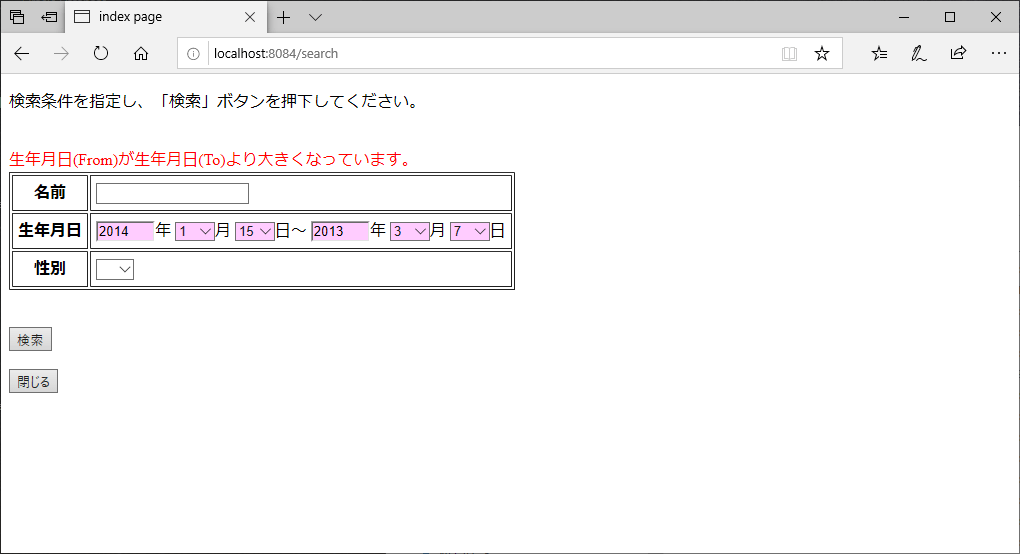
また、入力画面でエラーが発生した場合は、例えば以下のような画面表示となる。
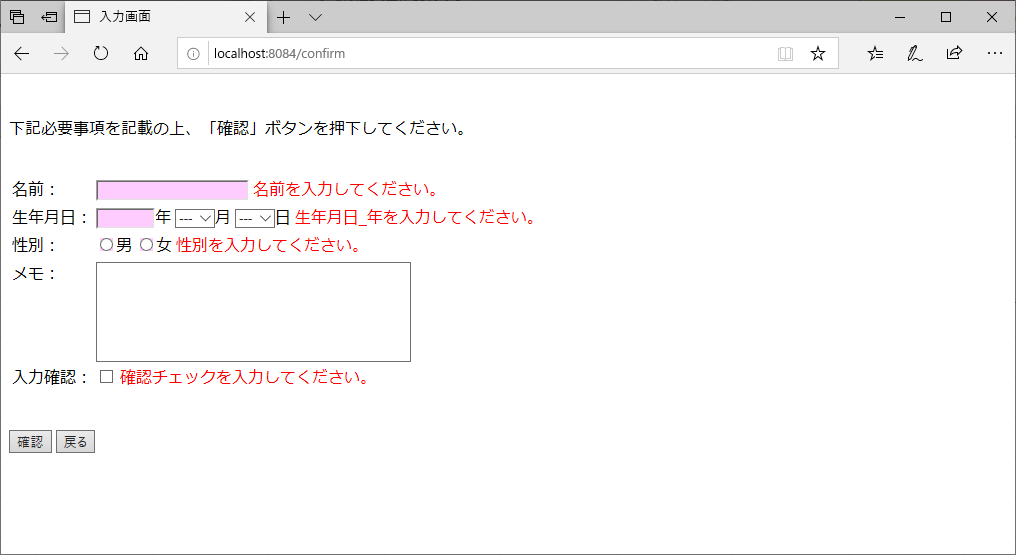
下記記事の「完成した画面イメージの共有」と違い、@AssertTrueアノテーションを付与した生年月日のチェックも、他の項目のチェック処理と同じタイミングで実行されることが確認できる。

要点まとめ
- 特定のFormオブジェクトで@AssertTrueアノテーションを付与する形でも、相関チェックを行うことができる。この相関チェックは、同じFormオブジェクト内の他のチェック処理と同じタイミングで実行される。