Azure App ServiceからCosmos DBデータベースにアクセスしてみた
Cosmos DBデータベースにアクセスする処理として、Azure Cosmos DB Spring Boot Starterという便利なライブラリがある。今回は、Azure App ServiceからCosmos DBデータベースにアクセスしてみたので、そのサンプルプログラムを共有する。
前提条件
下記記事の実装が完了していること。

また、下記記事のCosmos DBデータベースの作成が完了していること。

サンプルプログラムの作成
作成したサンプルプログラム(App Service側)の構成は以下の通り。なお、Azure Functions側のソースコードは修正していない。
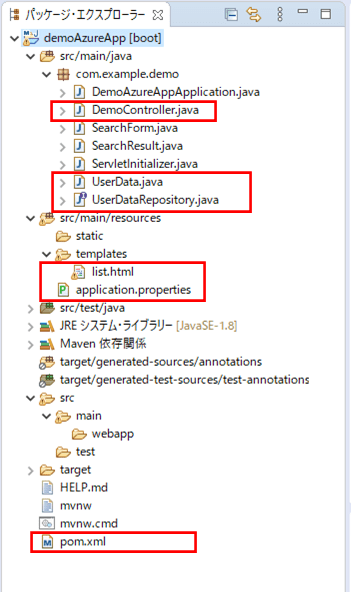
なお、上記の赤枠は、前提条件のプログラムから追加・変更したプログラムである。
pom.xmlの内容は以下の通りで、Azure Cosmos DBに接続するためのAzure Cosmos DB Spring Boot Starterを追加している。
<?xml version="1.0" encoding="UTF-8"?>

<project xmlns="http://maven.apache.org/POM/4.0.0"
     xmlns:xsi="http://www.w3.org/2001/XMLSchema-instance"
     xsi:schemaLocation="http://maven.apache.org/POM/4.0.0 https://maven.apache.org/xsd/maven-4.0.0.xsd">
  <modelVersion>4.0.0</modelVersion>
  <parent>
    <groupId>org.springframework.boot</groupId>
    <artifactId>spring-boot-starter-parent</artifactId>
    <version>2.3.4.RELEASE</version>
    <relativePath/>
    <!-- lookup parent from repository -->
  </parent>
  <groupId>com.example</groupId>
  <artifactId>demoAzureApp</artifactId>
  <version>0.0.1-SNAPSHOT</version>
  <packaging>war</packaging>
  <name>demoAzureApp</name>
  <description>Demo project for Spring Boot</description>
  <properties>
    <java.version>1.8</java.version>
  </properties>
  <dependencies>
    <dependency>
      <groupId>org.springframework.boot</groupId>
      <artifactId>spring-boot-starter-thymeleaf</artifactId>
    </dependency>
    <dependency>
      <groupId>org.springframework.boot</groupId>
      <artifactId>spring-boot-starter-web</artifactId>
    </dependency>
    <!-- lombokの設定 -->
    <dependency>
      <groupId>org.projectlombok</groupId>
      <artifactId>lombok</artifactId>
      <scope>provided</scope>
    </dependency>
    <!-- Azure Cosmos DBに接続するための設定 -->
    <dependency>
       <groupId>com.microsoft.azure</groupId>
       <artifactId>azure-cosmosdb-spring-boot-starter</artifactId>
       <version>2.3.3</version>
    </dependency>
    <dependency>
      <groupId>org.springframework.boot</groupId>
      <artifactId>spring-boot-starter-tomcat</artifactId>
      <scope>provided</scope>
    </dependency>
    <dependency>
      <groupId>org.springframework.boot</groupId>
      <artifactId>spring-boot-starter-test</artifactId>
      <scope>test</scope>
    </dependency>
  </dependencies>
  <build>
    <plugins>
      <plugin>
        <groupId>org.springframework.boot</groupId>
        <artifactId>spring-boot-maven-plugin</artifactId>
      </plugin>
      <plugin>
        <groupId>com.microsoft.azure</groupId>
        <artifactId>azure-webapp-maven-plugin</artifactId>
        <version>1.12.0</version>
        <configuration>
          <schemaVersion>v2</schemaVersion>
          <subscriptionId>(ログインユーザーのサブスクリプションID)</subscriptionId>
          <resourceGroup>azureAppDemo</resourceGroup>
          <appName>azureAppDemoService</appName>
          <pricingTier>B1</pricingTier>
          <region>japaneast</region>
          <appServicePlanName>ASP-azureAppDemo-8679</appServicePlanName>
          <appServicePlanResourceGroup>azureAppDemo</appServicePlanResourceGroup>
          <runtime>
            <os>Linux</os>
            <javaVersion>Java 8</javaVersion>
            <webContainer>Tomcat 8.5</webContainer>
          </runtime>
          <deployment>
            <resources>
              <resource>
                <directory>${project.basedir}/target</directory>
                <includes>
                  <include>*.war</include>
                </includes>
              </resource>
            </resources>
          </deployment>
        </configuration>
      </plugin>
    </plugins>
  </build>
</project>
application.propertiesの内容は以下の通りで、Azure Cosmos DBの接続先を設定している。
server.port = 8084

# Azure Cosmos DB接続先
# ここでは、URI、プライマリキー、データベースを指定している
azure.cosmosdb.uri=https://azurecosmospurinit.documents.azure.com:443/
azure.cosmosdb.key=(プライマリキー)
azure.cosmosdb.database=purinitdb
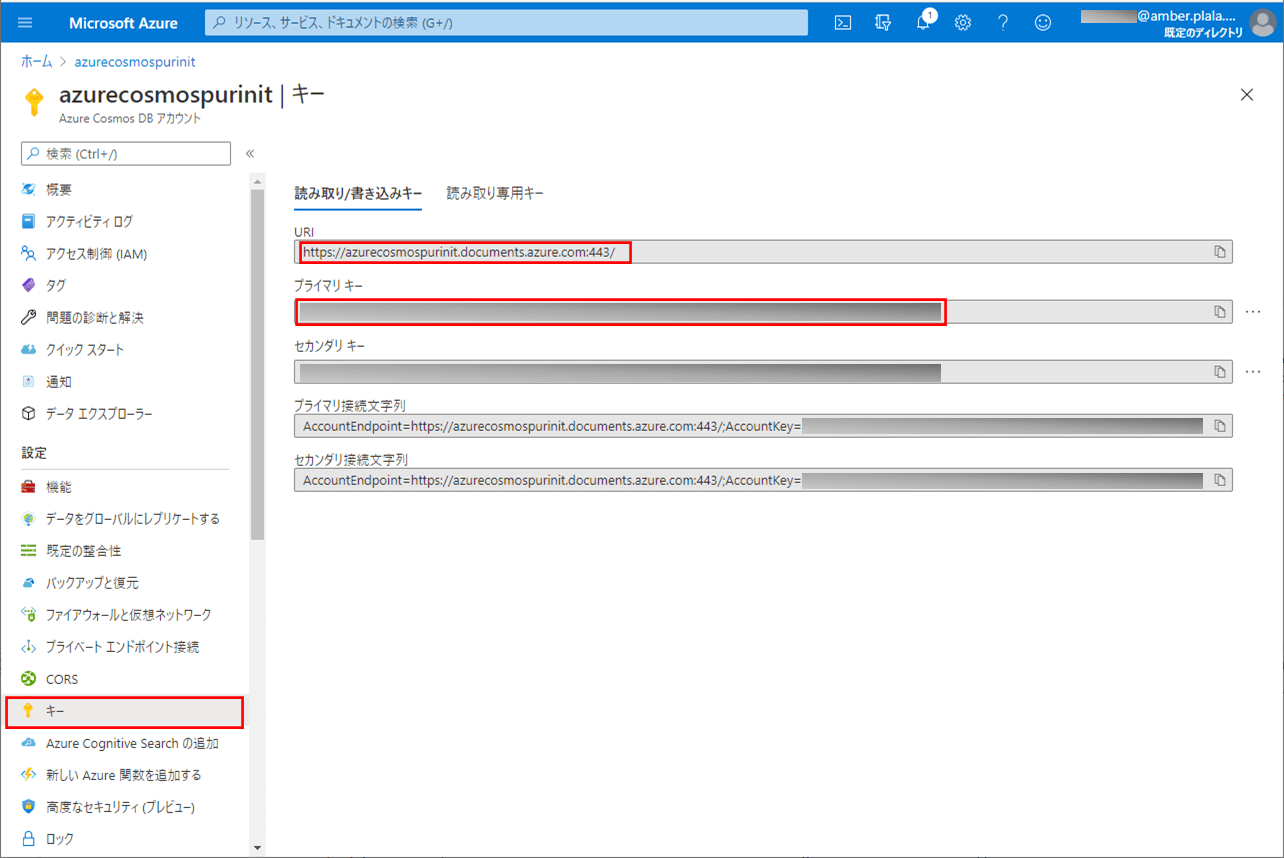
なお、上記のURIとキーは、以下の画面のURIとプライマリキーから取得している。
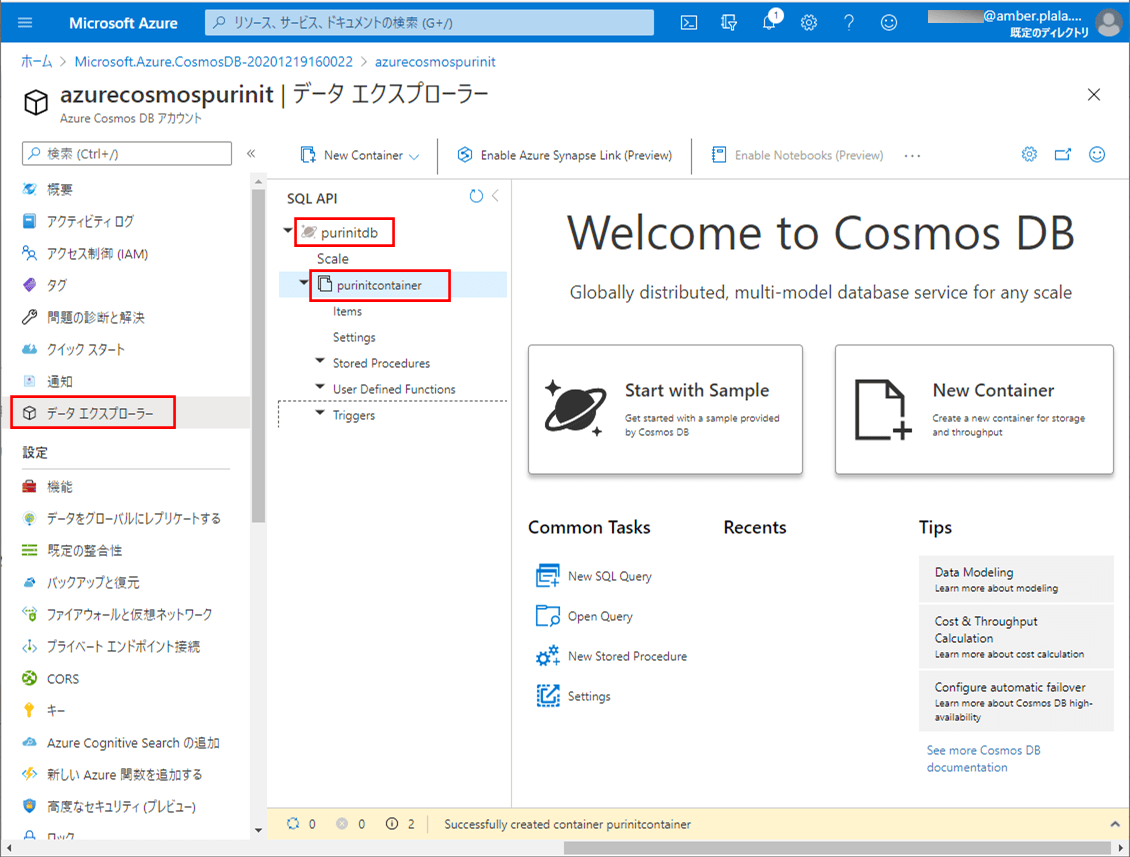
また、上記のデータベース名と後述のコンテナ名は、以下のデータ エクスプローラー画面から取得している。
また、UserDataクラスの内容は以下の通りで、コレクションにコンテナ名を指定している。
package com.example.demo;

import org.springframework.data.annotation.Id;
import com.microsoft.azure.spring.data.cosmosdb.core.mapping.Document;
import lombok.Data;

//Cosmos DBのユーザーデータテーブルのエンティティ
//collectionにCosmos DBのコンテナ名を指定する
@Data
@Document(collection = "purinitcontainer")
public class UserData {

    /** ID */
    @Id
    private String id;

    /** 名前 */
    private String name;

    /** 生年月日_年 */
    private Integer birth_year;

    /** 生年月日_月 */
    private Integer birth_month;

    /** 生年月日_日 */
    private Integer birth_day;

    /** 性別 */
    private String sex;

}
さらに、Cosmos DBのユーザーデータテーブルを操作するリポジトリの内容は以下の通りで、Cosmos DBにアクセスするためのReactiveCosmosRepositoryインタフェースを継承し、検索に必要なメソッドをいくつか追加している。
package com.example.demo;

import org.springframework.stereotype.Repository;
import com.microsoft.azure.spring.data.cosmosdb.repository.ReactiveCosmosRepository;
import reactor.core.publisher.Flux;

// Cosmos DBのユーザーデータテーブルを操作するためのリポジトリ
@Repository
public interface UserDataRepository extends ReactiveCosmosRepository<UserData, String> {

    /**
     * ユーザーデータテーブルから、指定した性別に完全一致するデータを返す
     * @param sex 性別
     * @return 検索結果
     */
    public Flux<UserData> findBySex(String sex);

    /**
     * ユーザーデータテーブルから、指定した名前に部分一致するデータを返す
     * @param name 名前
     * @return 検索結果
     */
    public Flux<UserData> findByNameContains(String name);

    /**
     * ユーザーデータテーブルから、指定した名前に部分一致し、性別に完全一致するデータを返す
     * @param name 名前
     * @param sex  性別
     * @return 検索結果
     */
    public Flux<UserData> findByNameContainsAndSex(String name, String sex);

}
また、コントローラクラスの内容は以下の通りで、searchメソッド内で前述のリポジトリを呼び出している。
package com.example.demo;

import java.util.ArrayList;
import org.springframework.beans.factory.annotation.Autowired;
import org.springframework.stereotype.Controller;
import org.springframework.ui.Model;
import org.springframework.util.StringUtils;
import org.springframework.web.bind.annotation.GetMapping;
import org.springframework.web.bind.annotation.PostMapping;
import reactor.core.publisher.Flux;

@Controller
public class DemoController {

    /** DBからユーザーデータを取得するリポジトリ */
    @Autowired
    private UserDataRepository userDataRepository;

    /**
     * 検索一覧画面を初期表示する
     * @param model Modelオブジェクト
     * @return 検索一覧画面
     */
    @GetMapping("/")
    public String index(Model model) {
        SearchForm searchForm = new SearchForm();
        model.addAttribute("searchForm", searchForm);
        return "list";
    }

    /**
     * 検索条件に合うユーザーデータを取得し、一覧に表示する
     * @param searchForm 検索条件Form
     * @param model      Modelオブジェクト
     * @return 検索一覧画面
     */
    @PostMapping("/search")
    public String search(SearchForm searchForm, Model model) {
        // 検索条件に合うユーザーデータを取得する
        ArrayList<UserData> userDataList = search(searchForm);
        searchForm.setUserDataList(userDataList);

        model.addAttribute("searchForm", searchForm);
        return "list";
    }

    /**
     * DBから検索条件に合うユーザーデータを取得する
     * @param searchForm 検索条件Form
     * @return 検索結果
     */
    private ArrayList<UserData> search(SearchForm searchForm) {
        Flux<UserData> userDataFlux = null;

        // 検索条件に名前、性別が両方指定されている場合
        if (!StringUtils.isEmpty(searchForm.getSearchName())
            && !StringUtils.isEmpty(searchForm.getSearchSex())) {
             userDataFlux = userDataRepository.findByNameContainsAndSex(
                 searchForm.getSearchName(), searchForm.getSearchSex());
        // 検索条件に名前が指定されている場合
        } else if (!StringUtils.isEmpty(searchForm.getSearchName())) {
             userDataFlux = userDataRepository.findByNameContains(
                 searchForm.getSearchName());
        // 検索条件に性別が指定されている場合
        } else if (!StringUtils.isEmpty(searchForm.getSearchSex())) {
             userDataFlux = userDataRepository.findBySex(searchForm.getSearchSex());
        // 検索条件未指定の場合
        } else {
             userDataFlux = userDataRepository.findAll();
        }

        // 性別(1,2)を(男,女)に変換し返す
        ArrayList<UserData> userDataList = new ArrayList<>();
        for (UserData userData : userDataFlux.collectList().block()) {
             userData.setSex("1".equals(userData.getSex()) ? "男" : "女");
             userDataList.add(userData);
        }
        return userDataList;
    }

}
さらに、HTMLファイルの内容は以下の通り。
<!DOCTYPE html>
<html lang="ja" xmlns:th="http://www.thymeleaf.org">
<head>
<meta charset="UTF-8">
<title>検索一覧画面</title>
</head>
<body>
	<form method="post" th:action="@{/search}" th:object="${searchForm}">
		<table border="1" cellpadding="5">
            <tr>
                <th>名前</th>
                <td><input type="text" th:value="*{searchName}" th:field="*{searchName}" /></td>
            </tr>
            <tr>
                <th>性別</th>
                <td>
                    <select th:field="*{searchSex}">
                        <option value=""></option>
                        <option th:each="item : *{getSexItems()}"
                                th:value="${item.key}" th:text="${item.value}"/>
                    </select>
                </td>
            </tr>
        </table>
        <br/><br/>
        <input type="submit" value="検索" />
        <br/><br/><br/><br/>
        <table border="1" cellpadding="5">
        	<tr>
        	    <th width="40">ID</th>
        	    <th width="180">名前</th>
        	    <th width="180">生年月日</th>
        	    <th width="40">性別</th>
        	</tr>
        	<tr th:each="obj : *{userDataList}">
        	    <td th:text="${obj.id}" align="center"></td>
        	    <td th:text="${obj.name}" align="center"></td>
        	    <td th:text="|${obj.birth_year}年 ${obj.birth_month}月 ${obj.birth_day}日|" align="center"></td>
        	    <td th:text="${obj.sex}" align="center"></td>
        	</tr>
        </table>
	</form>
</body>
</html>
その他のソースコード内容は、以下のサイトを参照のこと。
https://github.com/purin-it/azure/tree/master/azure-app-service-to-cosmos-db/demoAzureApp
サンプルプログラムの実行結果
サンプルプログラムの実行結果は、以下の通り。
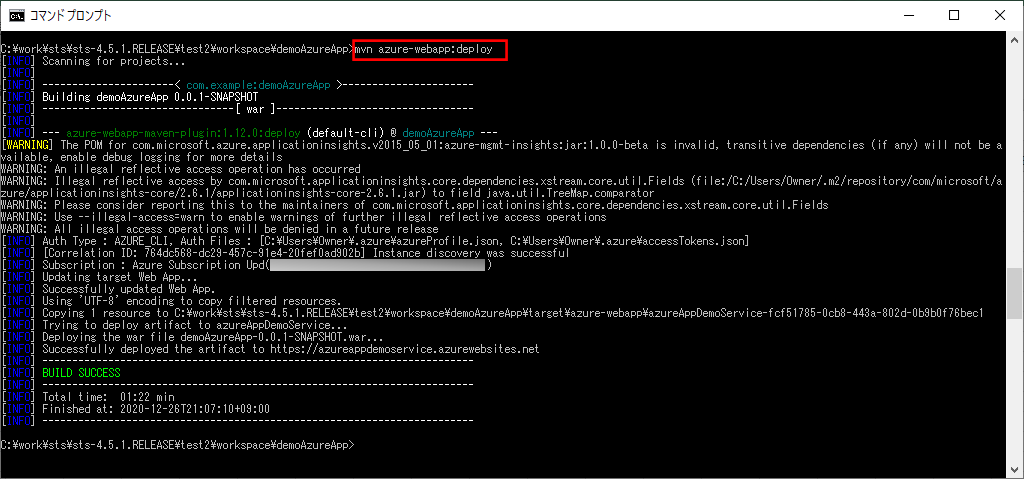
1)「mvn azure-webapp:deploy」コマンドによって、Azure App Service上にサンプルプログラムをデプロイする。
なお、Azure App Serviceにデプロイする過程は、以下の記事の「App ServiceへのSpring Bootを利用したJavaアプリケーションのデプロイ」を参照のこと。

2) Azure App ServiceのURL「https://azureappdemoservice.azurewebsites.net/」とアクセスした場合の実行結果は、以下の通り。
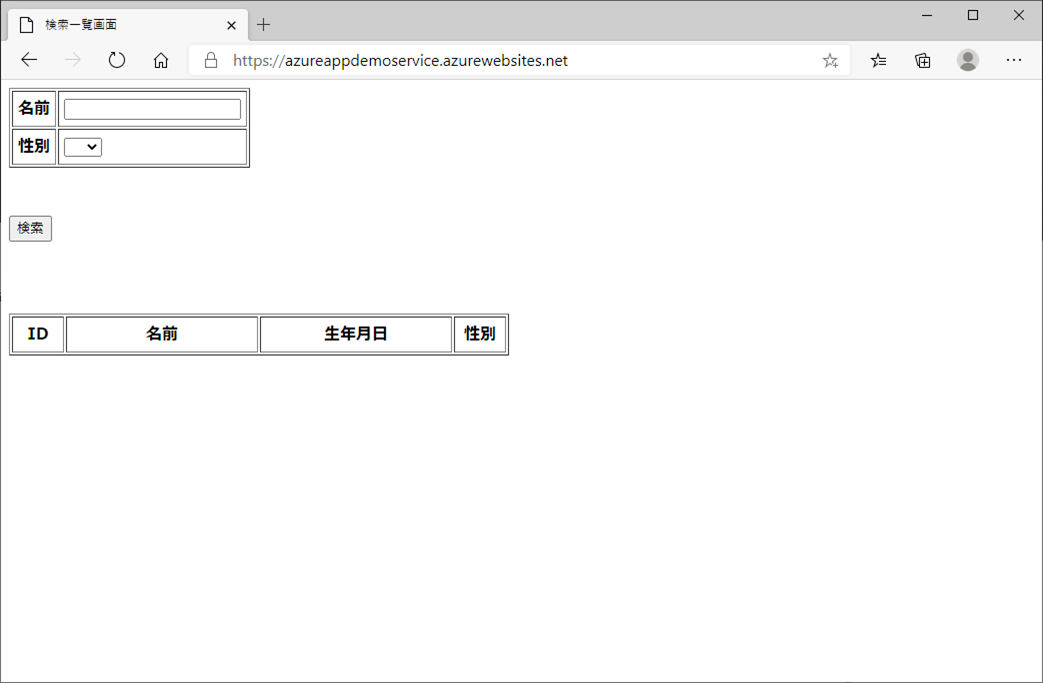
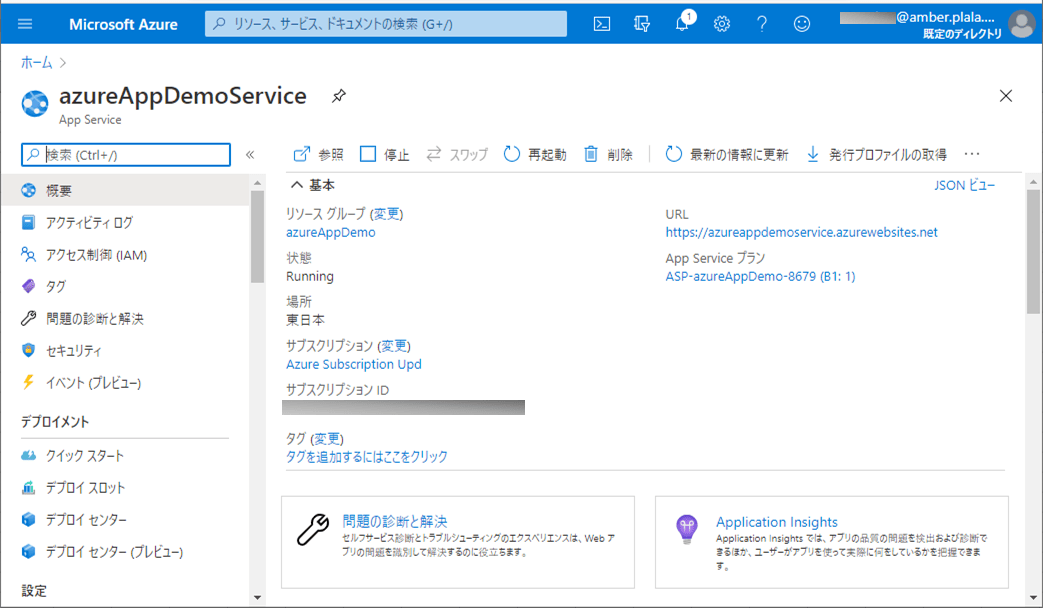
なお、上記URLは、下記Azure App ServiceのURLから確認できる。
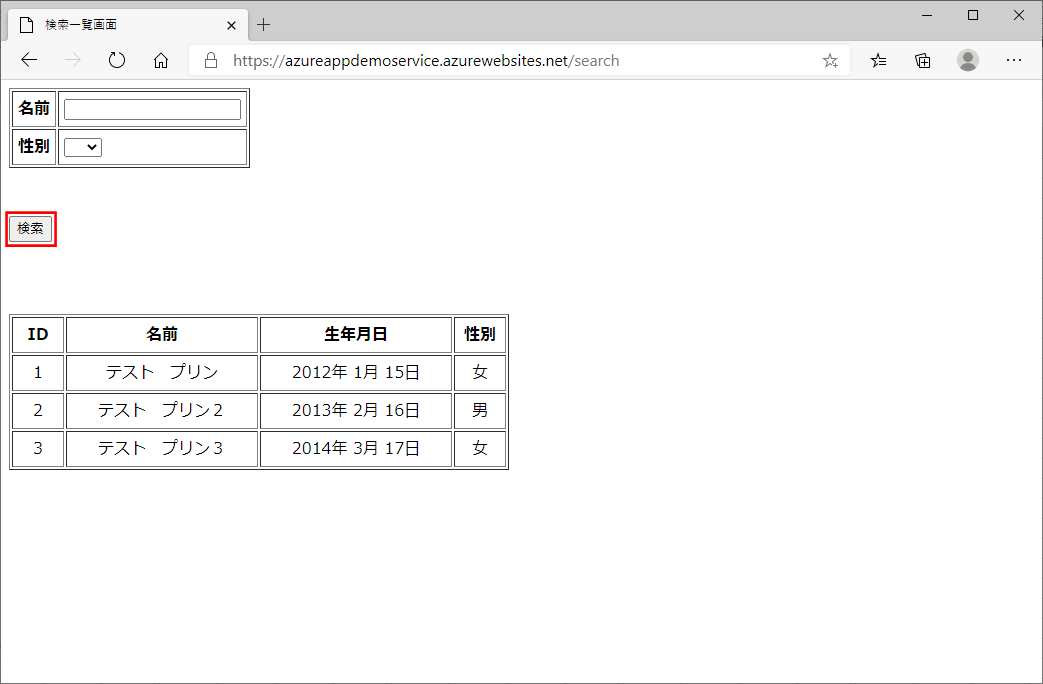
3) 名前、性別を指定せず「検索」ボタンを押下すると、以下のように、登録データが全て表示される。
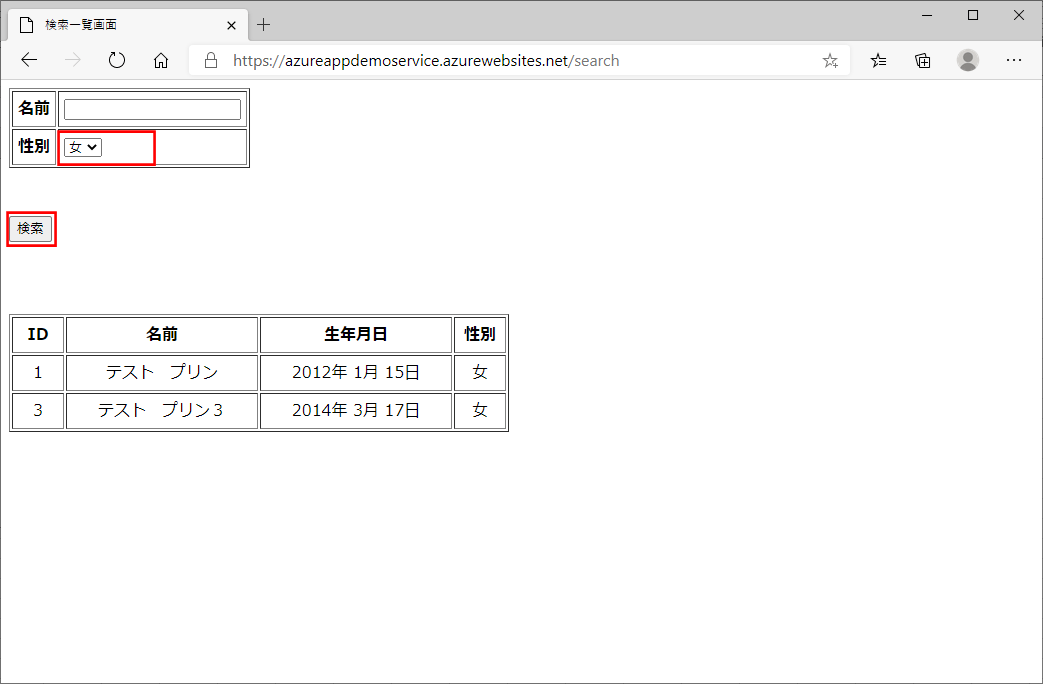
4) 性別を指定し「検索」ボタンを押下すると、以下のように、指定した性別のデータが表示される。
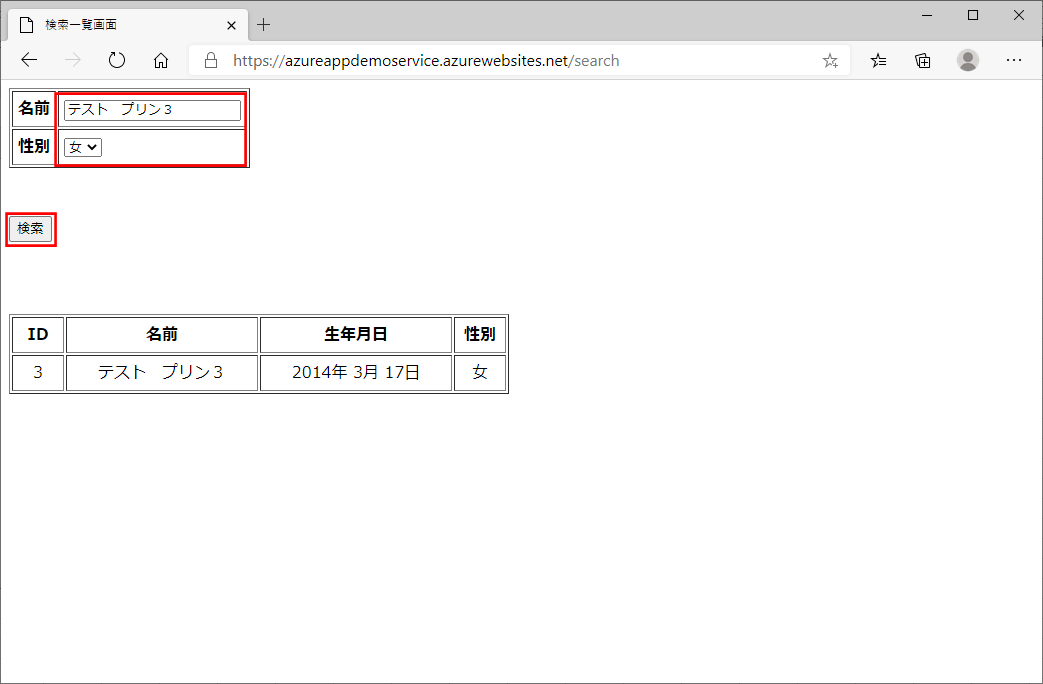
5) 名前、性別を指定し「検索」ボタンを押下すると、以下のように、指定した名前、性別のデータが表示される。
要点まとめ
- Cosmos DBデータベースにアクセスする処理は、Azure Cosmos DB Spring Boot Starterというライブラリを利用すると便利である。